

AURORA
Vocal Cleanup
$9.99 / month
FINDING YOUR FREQUENCY
( 001 )
Vocal Resonance Cleanup
Vocal Resonance Cleanup PLUGIN
$9.99 / month
Reduce harsh resonances and soften sharp S sounds.
BLOOM reduces resonant peaks that make vocals sound harsh or ring out. Silk softens sharp S sounds, while Protect helps keep the lower body of the voice.
DIGITAL PRODUCT · EXTERNAL CHECKOUT VIA LEMON SQUEEZY
Load BLOOM on your track as a VST3 effect.


VST3 & AU hosts
The DAWs shown support VST3 or Audio Units. Check your DAW version and operating system before installing. Host format support does not mean every version has been individually tested.
Windows x64 with a compatible 64-bit VST3 host, or macOS 13 or later (Intel or Apple Silicon) with a VST3 or Audio Units host. Internet is required for license activation and periodic validation. The Windows installer is unsigned. AAX is not included.
Use the AU version in Logic Pro. Pro Tools requires AAX, which is not included.
This demo uses selected settings and controls. Hear BLOOM process this clip. The full plugin lets you adjust more settings and use your own recordings.
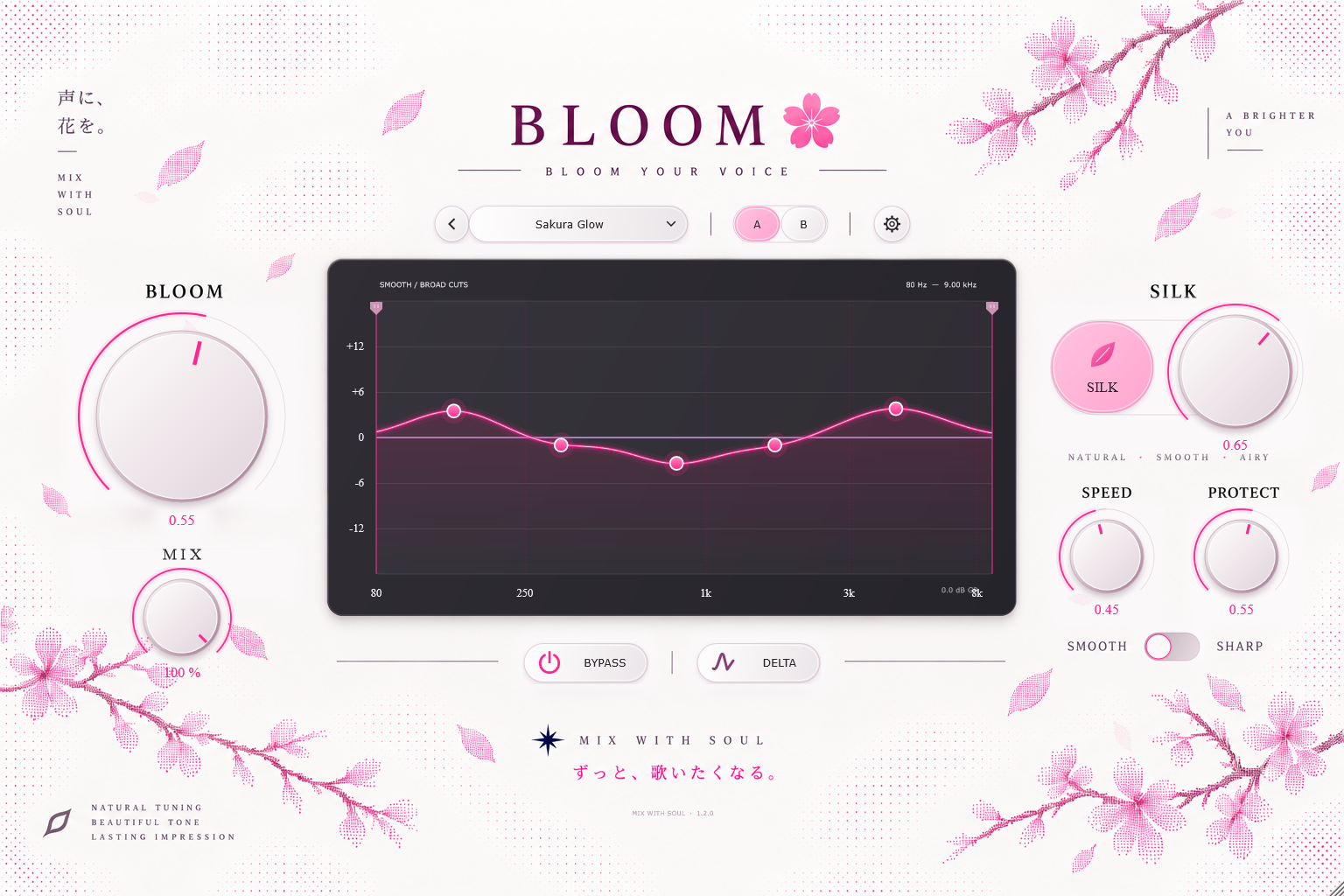
Press Play to hear the plugin's fixed preset. Switch Bypass on to hear the original, then off to hear the effect.
Press Play to load the audio.
Pink fill: input spectrum. Purple: native cuts. Pink line: fixed sensitivity. 80 Hz–9 kHz.
Play with bypass off to see the input spectrum and native frequency cuts.
The sound settings use a fixed native preset. Only bypass changes the processing.
BLOOM reduces resonant peaks that make vocals sound harsh or ring out. Silk softens sharp S sounds, while Protect helps keep the lower body of the voice.
Bloom
Turn up Bloom to reduce more of the resonant frequencies that stand out. Back it off if the vocal starts to sound dull.
Silk
Silk reduces harsh high frequencies when they get too strong, including sharp S and SH sounds. Turn it down if the words lose too much detail.
Protect
Turn up Protect to reduce processing in the lower body of the voice. This helps keep its weight while Bloom works on the resonances.
THE DETAILS
BLOOM reduces resonant peaks that make vocals sound harsh or ring out. Silk softens sharp S sounds, while Protect helps keep the lower body of the voice.
VST3 · Windows x64 · VST3 + AU · macOS 13+ (Intel & Apple Silicon)
Windows x64 with a compatible 64-bit VST3 host, or macOS 13 or later (Intel or Apple Silicon) with a VST3 or Audio Units host. Internet is required for license activation and periodic validation. The Windows installer is unsigned. AAX is not included.
Purchases take place on Lemon Squeezy. The files and instructions offered for your purchase are provided through its checkout and receipt. This website does not collect payment details.
Use the audio player above to explore available previews. A downloadable trial has not been connected to this listing.

SOUND A HIGHER YOU.
MUSIC
FOR A BRIGHTER
TOMORROW.
DARARARABEATS
CREATE MORE.
//